How to Change or Add a Bybit Referral Code (November 2026)
Signed up to Bybit without a referral code — or stuck on a code that pays you nothing back? Here is what Bybit officially allows, the one legitimate route to re-bind your account, and what it unlocks: up to 50% of your trading fees back every day through code REBATLY.
REBATLYEnter it at signup. If you missed it, Bybit lets you add it within 14 days of registering, provided no code was used.The short answer
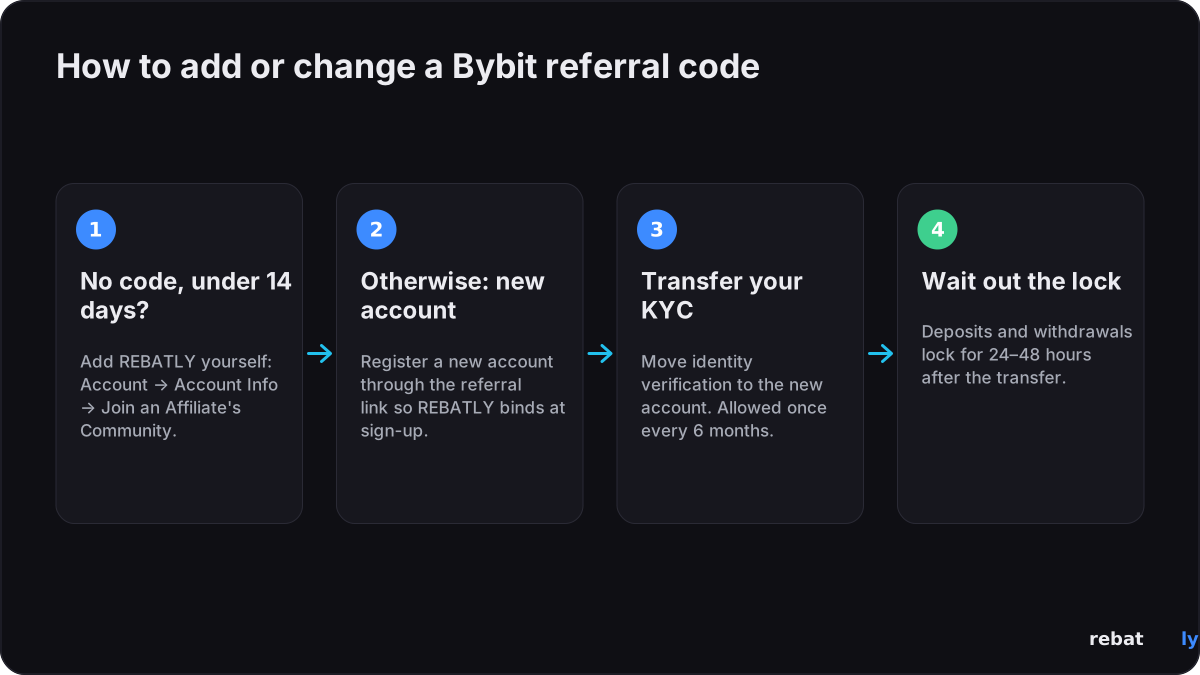
Bybit binds a referral at account creation, with one exception: a main account that has no affiliate or referral code can add an Affiliate code such as REBATLY within 14 days of registering (Account → Account Info → “Join an Affiliate's Community”), and once added it can't be changed. Past 14 days, or if a code is already on the account, Bybit won't accept a new one — and support cannot add one retroactively. Anyone selling a "support ticket workaround" is wasting your time. The legitimate route is below.
The official route: identity-verification transfer
Bybit lets you transfer your identity verification (KYC) from your current account to a new account — allowed once every 6 months. Register the new account through the referral link first (code REBATLY applies at signup), then move your KYC to it under Account & Security → Identity Verification, or via Bybit support. Expect deposits and withdrawals to lock for 24–48 hours after the transfer, so move funds before you start or wait it out.
| Step | What happens |
|---|---|
| 1. Withdraw or settle open positions | Your old account should be flat before the move |
| 2. Register a new account via the referral link | Code REBATLY binds at signup — do this before transferring KYC |
| 3. Transfer identity verification | Account & Security → Identity Verification (or ask support); allowed once per 6 months |
| 4. Wait out the lock | Deposits and withdrawals lock for 24–48h after the transfer |
What not to do
Don't open a second account on the same identity without the transfer — Bybit allows one account per verified person, and duplicates risk both accounts. Don't buy "aged" or pre-verified accounts: payouts go to the account's verified owner, not to you. And don't expect the new-user welcome bonuses twice — Bybit's new-user rewards generally apply once per person. You switch accounts for the rebate, not for a second welcome package.
Is switching worth it?
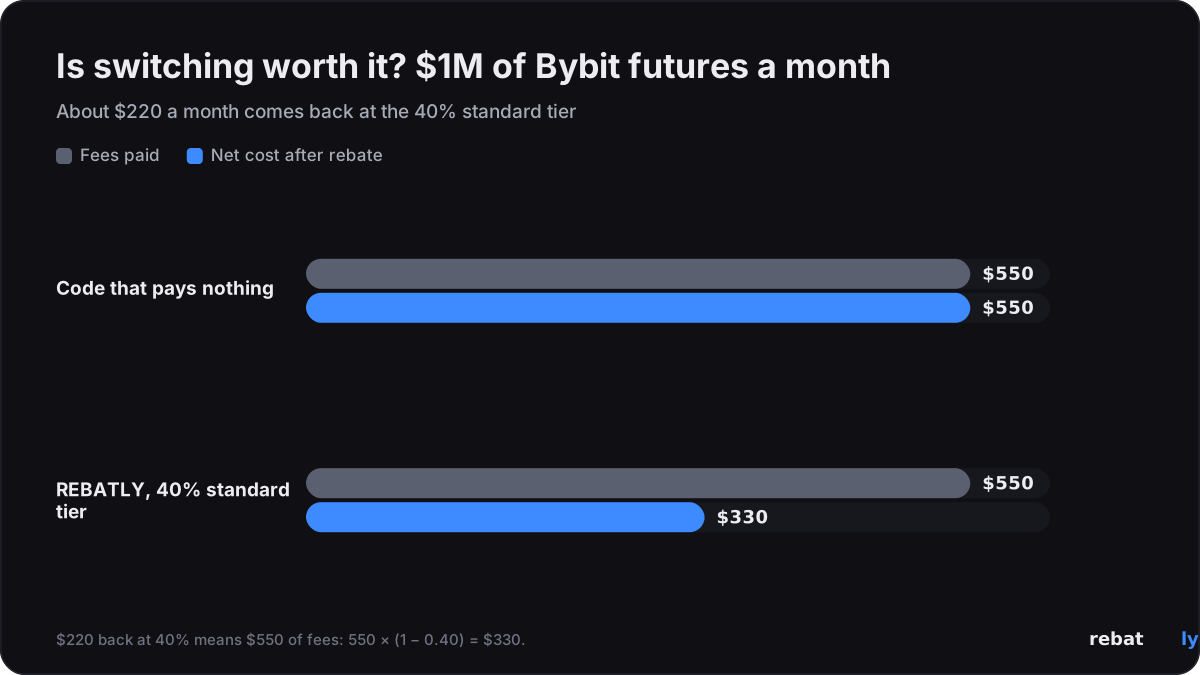
If your current code pays you nothing ongoing — which is the norm — then yes, quickly. A standard referral code is worth a one-time bonus; a rebate account returns up to 40–50% of every fee for as long as it keeps trading. At $1M monthly futures volume that is about $220 back per month on Bybit. The 6-month transfer cooldown means the sooner the switch, the sooner the meter starts.
The same question on OKX and Bitget
OKX and Bitget have no equivalent of Bybit's 14-day window: neither lets you attach a code yourself after registration. The official options differ by exchange:
| Exchange | Official way to re-bind | Cost / wait |
|---|---|---|
| Bybit | Transfer identity verification to a new account | Once per 6 months; 24–48h deposit/withdrawal lock |
| OKX | Close the existing account, then re-register via referral link | Same identity and email blocked for 30 days |
| Bitget | No official re-bind route | New account requires a different identity — not recommended |
Get fees back on every trade


$10M+ rebates paid · Paid daily in USDT · No password or API keys, ever
Already signed up? Check your link and rebate with @rebatlybot on Telegram, or reach our support at @rebatly.
🔔 Get a Telegram alert each time your rebate is paid: tap “Activate notifications” in @rebatlybot. New to trading? Your first trade in 5 steps.