iPhone crypto wallet flaw: what Binance warned about worse_query and how to stay safe
An iPhone crypto wallet flaw called worse_query can let a malicious app read files that other apps keep on the phone, Binance warned on X on 10 November 2026. Binance named iOS 26.7.1, 27.0.1 and 27.2 as affected and said seed phrases, private keys and login details could be at risk "across the entire ecosystem", not only in its own app. The risk depends on conditions: the bad app has to be installed first, and the secrets have to be stored in a readable form. No theft using the flaw has been confirmed. This article sets out what is known, what Apple and Binance have said and the steps iPhone users can take now.
 NO KYCSign up to BloFin
 Sign up to Bybit
 Sign up to OKX
 Sign up to Bitget
 Sign up to MEXC
 Sign up to OrangeX
 Sign up to Toobit
What Binance warned about
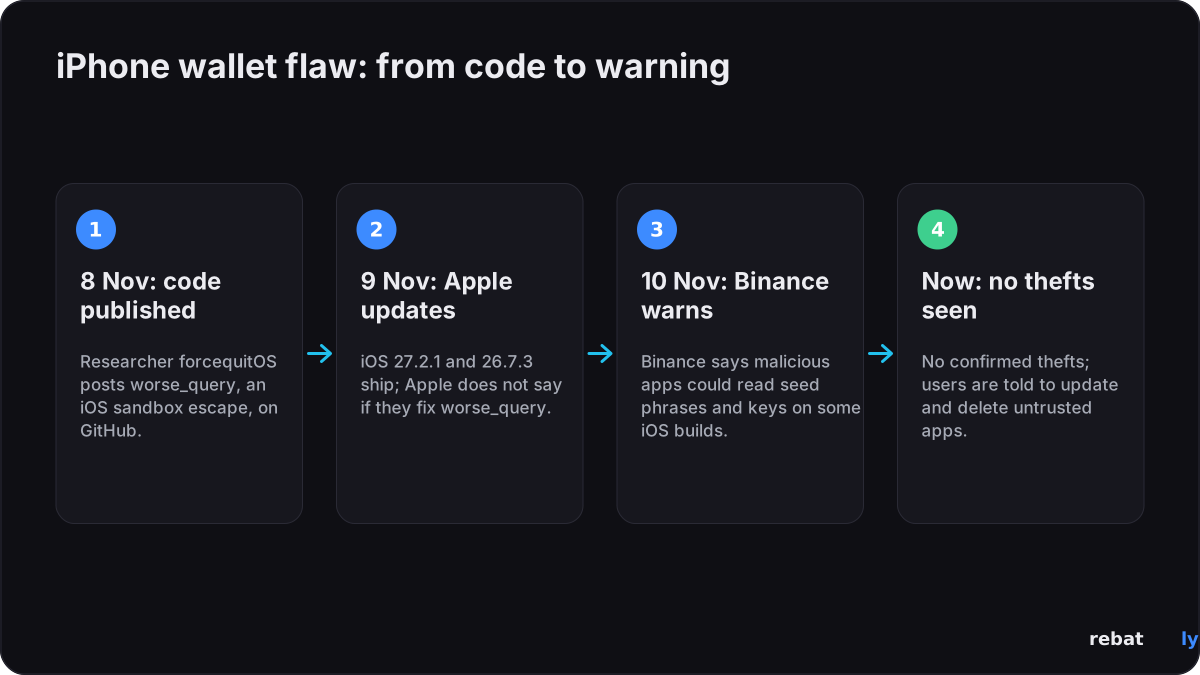
In a post on X on 10 November 2026, Binance said a vulnerability it called worse_query "allows malicious apps to read local files from other apps" on iOS 26.7.1, 27.0.1 and 27.2. It added: "This is an iOS-level issue, not unique to Binance." A Binance spokesperson told Cointelegraph the underlying file-access risk may apply across the iOS ecosystem and that Binance knows of no confirmed case of the bug being used to reach wallets or steal funds. As of 12 November, Binance had not posted a separate notice on its support announcements page; the X post is its only public statement.
Which iPhones and iOS versions are affected
Reports give two overlapping lists of affected versions, and Apple has not published its own. This is what each source says:
| iOS version | What is reported |
|---|---|
| iOS 26.7.1, 27.0.1 and 27.2 | Named as affected by Binance. BleepingComputer says a file-browsing tool built on the technique was confirmed to work on these three |
| iOS 26.0 to 26.7.2, and 27.2 | The range the researcher's own code page gives, according to Decrypt, Bitcoin.com and Cyber Security News |
| iOS 27.2.1 (9 November 2026) | Apple's latest update. Apple has not said whether it fixes worse_query; SlowMist's security chief 23pds says it blocks the technique |
| iOS 26.7.3 (9 November 2026) | Latest update for iPhones staying on iOS 26. Apple has not said whether it fixes worse_query |
How the iOS flaw works
Every iPhone app normally runs in its own sandbox, a walled-off area that other apps cannot read. worse_query is a way around part of that wall. A pseudonymous researcher known as forcequitOS published it on GitHub on 8 November, crediting a second researcher, 0xjohnny, Bitcoin.com and Cointelegraph reported. It is described as the successor to an earlier technique called bad_query.
The researchers themselves call it a proof of concept, not a finished attack tool or a jailbreak: on its own it does nothing harmful. To use it against someone, an attacker would need to get a malicious app onto that person's iPhone, for example a sideloaded or manually signed app from outside the App Store, Bitdefender and Decrypt explain. BleepingComputer reports that a tool called WQ Files already uses the technique to browse, export, edit and delete other apps' data without a jailbreak.
Which crypto apps are at risk
• Self-custody wallets that store secrets in readable files: SlowMist warned that a malicious app could read recovery phrases "if a wallet stores them unencrypted on the device", Cointelegraph reported. Its security chief 23pds also named keystores and cached browser data stored without encryption, according to Cyber Security News.
• Exchange apps: Binance listed login credentials among the data at risk. Exchange apps do not hold your coins on the phone, but a stolen login session could still be misused.
• Your own files: seed phrases saved in screenshots, photos or notes are the easiest target, Bitdefender notes.
Reading a file does not always mean reading a usable key: well-built wallets encrypt secrets or keep them in the iPhone's secure hardware. How exposed you are depends on how each app stores its data, and no source has published a list of affected wallet apps.
What Apple says and has patched
Apple has not commented publicly on worse_query, and BleepingComputer and Cointelegraph said they had asked Apple for comment. On 9 November, a day after the code went public, Apple released iOS 27.2.1, iOS 26.7.3 and, for older iPhones such as the XS and XR, iOS 18.7.12, according to its security updates page.
The iOS 27.2.1 notes list nine fixes. One of them, CVE-2026-113963 in App Intents, is described by Apple as an issue where "an app may be able to access sensitive user data". Apple does not link it to worse_query, and BleepingComputer notes the researcher credited for it describes access through App Intents, not the App Group storage worse_query uses. That fix is not in the iOS 26.7.3 notes. Apple marks none of the November fixes as exploited in the wild.
Is it linked to the Binance hack?
No. The warning came less than two weeks after the Binance hack of 29 October 2026, when about $6.3 billion was taken from Binance's own systems. Bitdefender and Bitcoin.com both say the iOS flaw has not been linked to that theft.
What iPhone users should do now
• Update iOS: go to Settings, General, Software Update and install the latest version (iOS 27.2.1, or iOS 26.7.3 if you stay on iOS 26). Apple has not confirmed a fix, but no source recommends staying on an older version.
• Update every app, especially wallets and exchange apps, from the App Store.
• Delete apps you do not trust, above all sideloaded or manually signed apps from outside the App Store.
• Keep seed phrases off the phone: no screenshots, photos, notes or cloud files. Write them down offline; for large amounts, a hardware wallet keeps keys off the phone entirely.
• If you suspect a compromise: create a new wallet on a clean device, move your funds to it, and log out of all active sessions on your exchange accounts. Updating iOS does not make secrets that may already have been read safe again.
• Beware fake "security update" messages: scammers copy warnings like this one. Apple delivers iOS updates only through Settings, and no exchange or wallet will ever ask for your seed phrase, password or 2FA code. Our article on exchange data breaches and scam messages shows what they look like.
• Check your exchange account: review login devices, API keys and your withdrawal address list, and keep 2FA switched on.
This is general security information, not financial advice.
What happens next
• Apple: a statement or updated security notes would settle whether iOS 27.2.1 and 26.7.3 close worse_query.
• Wallet makers: wallet apps may publish checks or updates on how they store secrets on iOS.
• Watch for: any confirmed case of funds stolen through the flaw; none had been reported as of 12 November.
We will update this article as Apple, Binance or wallet makers say more.
Trade with lower fees
Keeping your phone secure protects your account, and keeping fees low helps every trade. Sign up through Rebatly and part of every trading fee comes back to you: up to 50% on Bybit and Bitget, up to 40% on BloFin and OKX, up to 60% on MEXC and up to 65% on OrangeX futures. On Toobit, code Rebatly gives up to 60%, credited by Toobit itself, and BloFin credits up to 40% itself every hour; the other rebates are paid daily in USDT. Our guide to how a fee rebate works explains the rest.
This article reports news and is not financial advice. Rebatly is an independent affiliate; not financial advice.
Get fees back on every trade
$10M+ rebates paid · Paid daily in USDT · No password or API keys, ever
Already signed up? Check your link and rebate with @rebatlybot on Telegram, or reach our support at @rebatly.
🔔 Get a Telegram alert each time your rebate is paid: tap “Activate notifications” in @rebatlybot. New to trading? Your first trade in 5 steps.
November 12, 2026 — published. Sources: Binance, Apple, BleepingComputer, Cointelegraph, Decrypt, Bitdefender, Bitcoin.com, Cyber Security News.